

Youth Soccer Registration Made Simple for Houston Parents

The registration portal opens after dinner, your child is asking whether they got the same team as a friend, and you're trying to remember where the birth certificate landed. In Houston, that familiar pre-season scramble gets worse when practice locations, age divisions, uniforms, medical forms, and payment deadlines all live in different parts of the process.
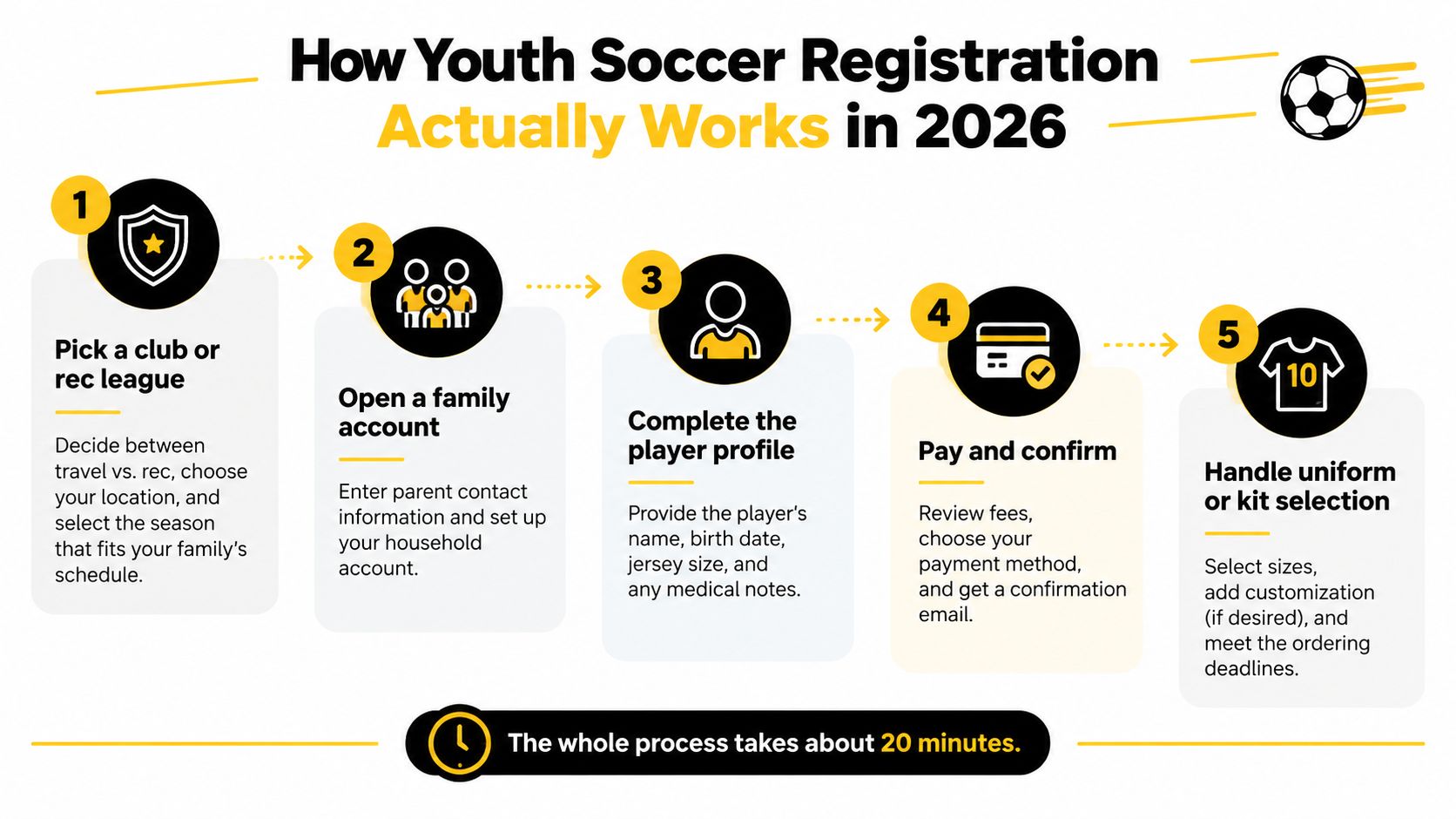
Treat youth soccer registration as a short project with five checkpoints, not as one form you rush through. Pick the right program, build the family account, complete the player record, pay and confirm, then handle the kit. That approach catches the mistakes that create the most trouble later, especially for new families.
How Youth Soccer Registration Actually Works in 2026
It's the night before a registration deadline in a Houston kitchen. One parent has the laptop open, another is searching for a medical insurance card, and the player is trying to decide whether recreational soccer or a more demanding team sounds better. The signup button is the easy part. The decisions around it determine whether the season fits your family.
Checkpoint one means choosing the right program
Start with the club or recreational league. Compare field location, season dates, practice expectations, game schedule, coaching model, and whether the program is recreational or competitive. Recreational soccer usually emphasizes accessible local play and a lighter schedule. Competitive, select, or academy programs generally involve evaluations, stronger time commitments, more travel, and a different fee structure.
Make that choice before creating the account if the platform presents separate registration paths. Selecting the wrong track can place your child in the wrong fee category or send you into a process designed for a different roster.
The next four checkpoints
Open the family account. Use the parent email and phone number that you'll monitor. League notifications, roster messages, schedule changes, and payment reminders often go there.
Complete the player profile. Have the child's legal name, birth information, jersey size, school details, emergency contacts, and medical notes ready.
Pay and confirm. Read the cart, refund policy, payment plan terms, and confirmation screen before submitting the card.
Handle the uniform or kit. Check whether the package is included, optional, or ordered separately. Don't assume the registration payment completes the uniform order.
Houston families often register for fall soccer during the summer and handle spring enrollment in a shorter window. Clubs may cap rosters early, particularly in younger divisions such as U6 through U12, because coaches, fields, and team assignments have to be arranged before the first practice. A waitlist usually means you should still submit the required information, but it doesn't guarantee placement or immediate team assignment. For a broader look at local league signup considerations, review this Houston soccer league registration guide.
If you're building or reviewing a registration workflow, you can also browse event form templates to see how forms group account, participant, consent, and payment fields. For parents, the same principle applies: each checkpoint should be clear enough that you know what happens next.
That structure matters beyond opening week. National participation is large and spread across multiple registration organizations. US Youth Soccer registration reporting says the organization registers nearly 2.5 million players annually and has grown from just over 100,000 registered players in 1974 to nearly 3 million today, operating through 54 state associations. Broader reporting places combined youth registrations across US Youth Soccer, US Club Soccer, and AYSO above 4 million players at more than 10,000 clubs. (Participation context) Registration is the first step in a longer relationship, so a confusing first experience can make re-enrollment harder.
Walking Through the Registration Form Step by Step
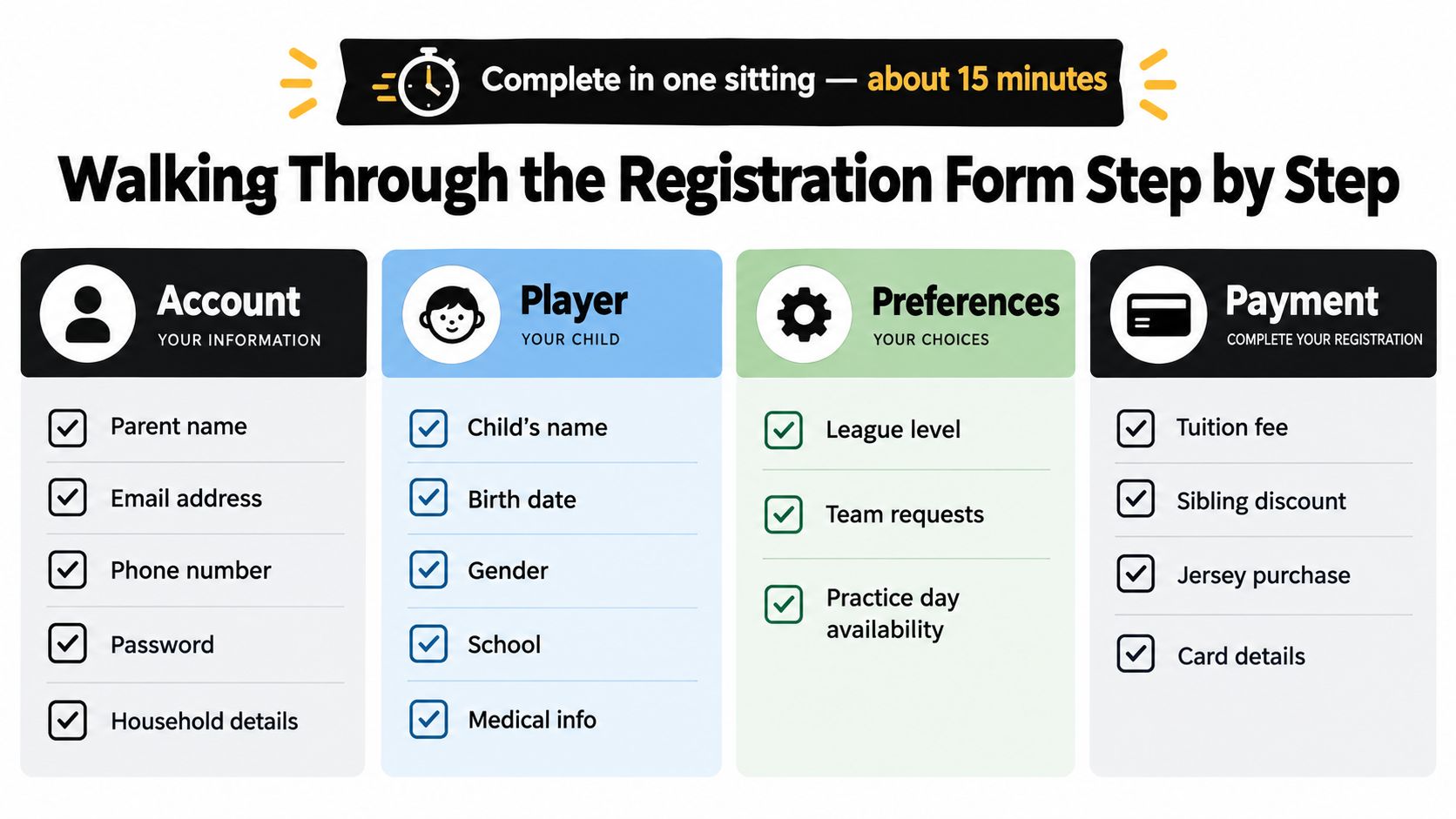
The cleanest way to finish a digital registration form is to treat it like four buckets. Don't jump randomly between fields. Gather the information first, complete one bucket at a time, and save only after you've checked the entries.
Bucket one is the family account
Enter the parent or guardian's legal name, active email, phone number, password, and household details. Use one primary account whenever possible rather than creating separate accounts for each child. That keeps siblings, invoices, confirmations, and roster messages together.
Before moving on, check spelling and phone digits. A mistyped email can turn a simple schedule update into a missed message. If the form asks for a second guardian, add that person if they'll handle pickups, payments, or emergency decisions.
Bucket two is the player record
Accuracy matters most. Enter the child's legal name, date of birth, gender, school, prior-season information, and the correct league level. Some Houston programs also ask for friend, sibling, teammate, or coach requests.
Those requests usually matter only when families enter them before teams are formed. Write names clearly and follow the program's instructions. A request isn't a guarantee, but leaving the field blank removes the opportunity for the club to consider it.
Check the age-group rule instead of guessing from grade, school year, or last season's team. Platforms may use birth information, grade-based rules, or club-specific division guidance.
Bucket three covers medical details and waivers
Complete allergies, asthma information, current medications, physician contact details, insurance policy information, and emergency contacts in one sitting. Coaches and administrators need this information before an incident occurs, not after a parent starts searching through a phone during practice.
Then review liability release language, photo and media consent, and concussion-policy acknowledgment. Read the refund and transfer terms while you're here, especially if evaluations or roster placement are involved.
Practical rule: If a medical field applies to your child, complete it fully. “We'll tell the coach later” is not a registration plan.
Bucket four is the checkout
The fields that stall families are often practical rather than complicated. A birth certificate upload may require the correct file type, a practice-night preference may depend on work and school schedules, and jersey-number selection may disappear once teams fill.
Before entering payment, stop at the cart screen. Verify the player, season, division, kit selection, discounts, payment plan, and total. The benefits of online registration for youth sports include convenience, but convenience only helps when the final cart matches what you intended to purchase.
Save the confirmation email immediately. If the system gives you a confirmation number or downloadable receipt, keep that too.
Getting the Uniform and Sizing Right the First Time
Guessing on the uniform is the most avoidable first-year mistake. Parents use last season's shirt, estimate from the child's age, or choose a larger size because they expect growth. Then the jersey arrives, the sleeves hang too low, or the shorts slide during play, and an exchange becomes difficult after the season has started.
Measure instead. Use a soft tape over a light T-shirt, keep it comfortably level, and record the result before opening the kit store. The three measurements that matter are chest circumference for the jersey, waist for shorts, and height or inseam for socks.
Use the measurements, not the label
The chart below gives a practical starting point for standard youth ranges. Club manufacturers vary, so compare these measurements with the specific brand's chart before ordering.
Size | Chest (in) | Waist (in) | Height (in) |
|---|---|---|---|
Youth Small | 25-27 | 22-23 | 45-50 |
Youth Medium | 27-29 | 23-24 | 50-55 |
Youth Large | 29-31 | 24-25 | 55-60 |
Youth XL | 31-33 | 25-27 | 60-65 |
Houston heat and humidity affect comfort. A jersey that fits tightly across the chest can feel especially restrictive during an August practice, while a slightly relaxed soccer jersey allows movement and airflow. Many jerseys run somewhat large, so don't automatically size up without checking the chart.
Children also change between spring tryouts and a fall kickoff. Choose enough room for ordinary growth, not an oversized shirt that interferes with running, passing, or goalkeeper movement. Goalkeeper tops and pinnies often fit differently and can run smaller, so measure those separately if the program lists distinct sizing.
Ask how the kit is sold
Some leagues bundle the jersey, shorts, and socks into registration. Others sell the kit separately, allow returning players to reuse pieces, or let families opt out of duplicate items. Ask whether customization, player numbers, name printing, and exchange shipping are included before you click purchase.
Late-July uniform delays can leave a team practicing in mismatched shirts during the opening week. Order as soon as the club confirms the deadline, but don't sacrifice measurement accuracy for speed. Families comparing alternatives can use this guide to find a cheap youth soccer jersey, then verify that the league permits outside apparel before buying.
Optional Add-Ons Parents Are Offered
Add-ons should earn their place in your budget. A registration page may present upgrades as a package deal, but a discount only helps if your child will use every item and the program's refund rules allow changes.
Add-On | Typical Cost | Who Benefits | Safe to Skip? |
|---|---|---|---|
Uniform package upgrade | Varies by club | Families needing a complete kit | Yes, if required pieces are already covered |
Spirit wear and warm-ups | Varies by club | Players who attend games and team events | Usually |
Travel or tournament fees | Varies by event | Competitive teams committed to the event | Yes, if your child won't attend |
Personal training pass | Varies by provider | Players seeking extra individual instruction | Usually |
Photo package | Varies by photographer | Families wanting formal team photos | Yes |
Tournament-only registration | Varies by program | Select players joining a specific event | Yes, unless the coach requires it |
A uniform upgrade makes sense when the base registration includes only a jersey or when your child needs match-day shorts and socks. It doesn't make sense to buy duplicates because the checkout screen makes the full bundle look simpler.
Spirit wear and warm-ups are personal choices. Houston mornings can be cool during parts of the year, but a branded sweatshirt isn't a development requirement. Buy one if your child will wear it. Skip it if it's mostly an impulse purchase.
Travel and tournament fees deserve a direct question. Ask which event the charge covers, whether transportation and lodging are separate, and what happens if the team withdraws. A personal training pass can help a player who wants extra technical work, but it isn't necessary for a beginner who needs consistent team practice first.
Photo packages and tournament-only registrations are easy to decline unless you have a specific reason to buy them. Watch seasonal deadlines, cancellation policies, and nonrefundable charges. Bundling tactics often rely on the parent feeling that every line item is part of being a committed soccer family.
Decision rule: Ask, “Does this change what my child does on Saturdays, or is it a swag bundle dressed up as development?” If it doesn't affect participation, instruction, safety, or a required team event, you can skip it.
Deadlines, Re-Enrollment, and Where Kids Drop Off
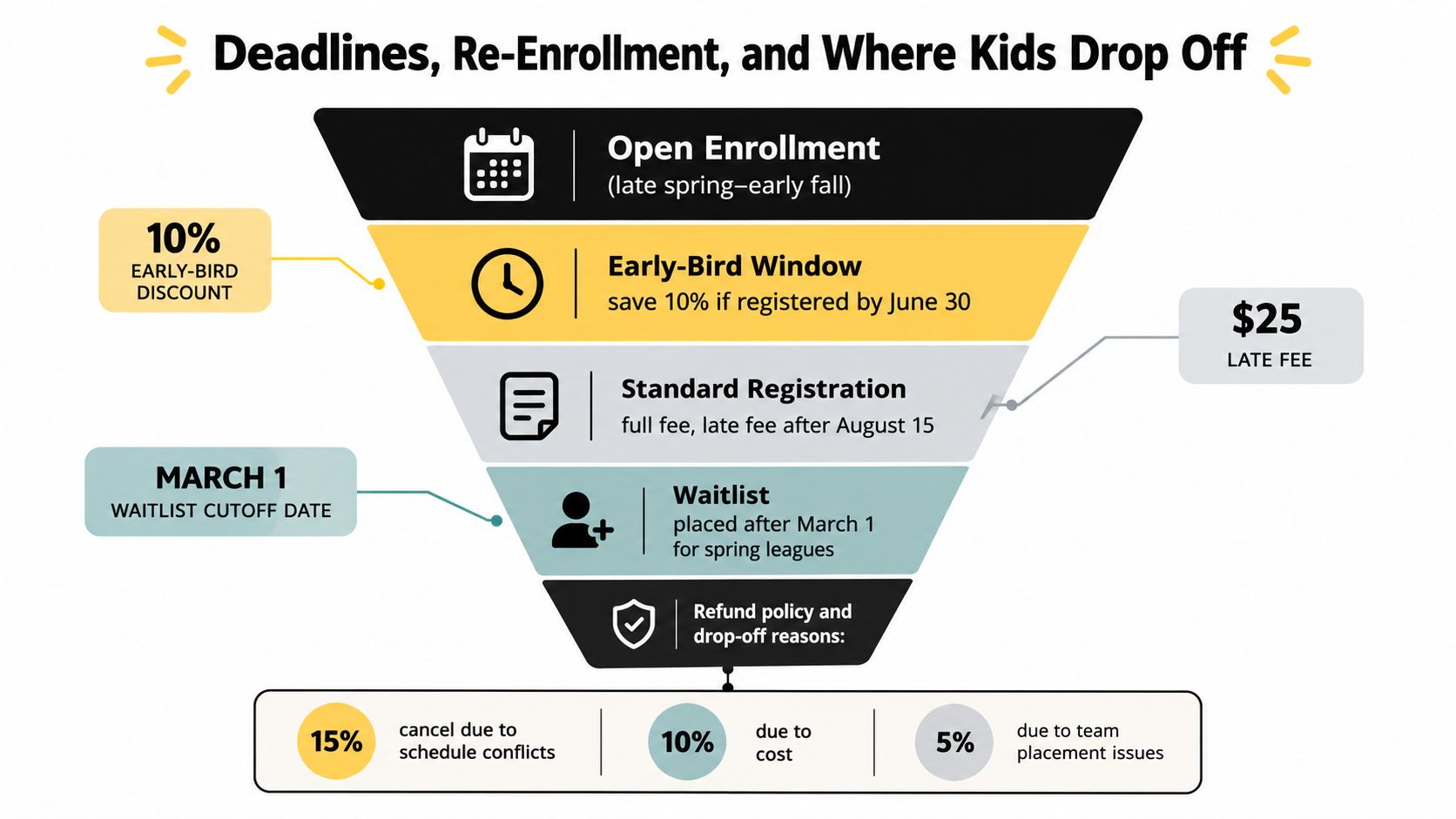
Houston registration calendars usually move from open enrollment into early-bird periods, standard registration, and then waitlists. Fall programs often open during late spring or summer and continue into early fall. Spring programs tend to give families a shorter signup window because clubs are working around an existing season and limited roster openings.
The exact dates vary by program, so read the club calendar rather than relying on last season's email. Early registration can protect a roster spot, but registering immediately isn't automatically wise if you haven't confirmed the division, schedule, refund policy, or uniform requirements.
The quiet age-group exits
A U8 player may skip one spring season because baseball, school activities, or a family trip takes priority. Without a calendar reminder, that skipped season can become a missed re-enrollment window, then a lost team connection. At U10 and U12, friend groups often make returning easier, but parents still need to confirm the next season before schedules fill.
The more important transition arrives around early adolescence. A 2025 soccer benchmark report found retention of 78% for Girls U8-U13 and 77% for Boys U8-U13, compared with 67% for both Girls and Boys U14-U17. (Sprocket Sports Player Retention Report) That gap makes the move toward U14 a registration problem as much as a coaching problem.
A U14 family may suddenly face school workload, club tryouts, travel decisions, and a schedule that no longer resembles recreational soccer. If the family waits until an invoice arrives, the player may already feel disconnected from the team.
Build re-enrollment into the original signup
Ask at registration whether the program offers a multi-season option, payment plan, or automatic reminder. Put the next enrollment opening on your calendar before the current season begins. A guided re-enrollment workflow, clear age-specific communication, and fewer manual steps can keep a family from dropping out.
The practical lesson is simple: younger participation is stronger than the adolescent transition, so don't treat U14 as a routine renewal. Talk with your child early about school, travel, training, and whether recreational or competitive soccer still fits.
Families who prefer a visual explanation of registration timing can use the following video as another reference.
Common Registration Mistakes and Final Checklist
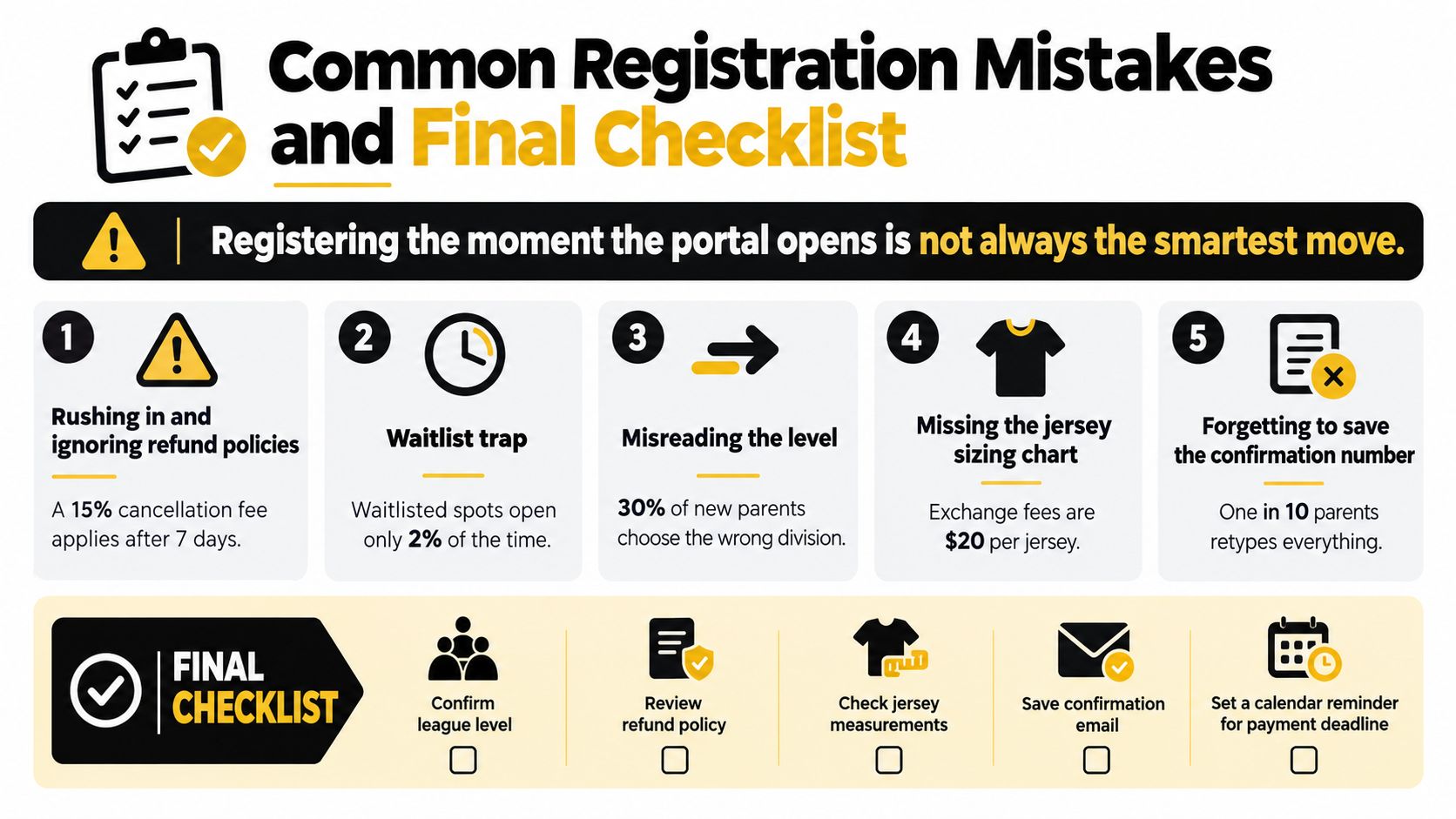
Registering the moment the portal opens isn't always the smartest move. Speed helps when rosters are limited, but rushing before you understand the division, schedule, kit, medical requirements, and refund rules creates errors that are harder to fix than a careful submission.
The first mistake is uploading the wrong document. A parent may select a phone photo instead of the requested file format, attach a sibling's document, or submit an outdated record. Open every upload after attaching it and confirm that the name is readable.
Division selection causes another avoidable problem. Don't choose based only on the child's current grade or last season's team. Check the club's age-group guidance, birth-date rules, and any evaluation instructions before selecting the level.
Coach requests and practice preferences also need attention. If your league considers friend or coach requests only when entered early, leaving those fields blank can limit what the administrator can accommodate. Practice-night preferences aren't guaranteed, but they still need to reflect your real availability.
Medical and emergency fields shouldn't wait until the end. Forms can time out, especially when a parent leaves the browser to search for information. Gather the records first, complete the fields, and read the waiver and refund policy before payment.
Uniform sizing deserves its own check. Last season's shirt is not a measurement, and a child's current chest, waist, and height may no longer match the old size.
The five-checkpoint final review
Documents on hand: Confirm that required identification and uploads belong to the correct player and meet the requested format.
Child information accurate: Review legal name, birth information, division, school, requests, and practice preferences.
Medical and waiver complete: Check allergies, medications, emergency contacts, insurance details, liability release, media consent, and concussion acknowledgment.
Payment and policy read: Review every cart line, payment plan, refund rule, transfer condition, and kit charge before submitting.
Uniform sizing measured: Recheck chest, waist, and height or inseam instead of copying last season's size.
After payment, screenshot the confirmation page and email it to yourself. Keep the receipt, confirmation number, and any waitlist notice in one folder so you can prove what you submitted when team assignments arrive.
JC Sports Houston offers online registration for youth leagues, classes, camps, and training in the Humble, Kingwood, and Atascocita area, including soccer opportunities for children ages 4 to 12. Visit JC Sports Houston to review the program options, check the registration details, and choose a soccer experience that fits your child's age and development needs.
Comments